Schedule templates from Symphony
Define recurrence and execution parameters to automate job runs.
Scheduling templates from Symphony
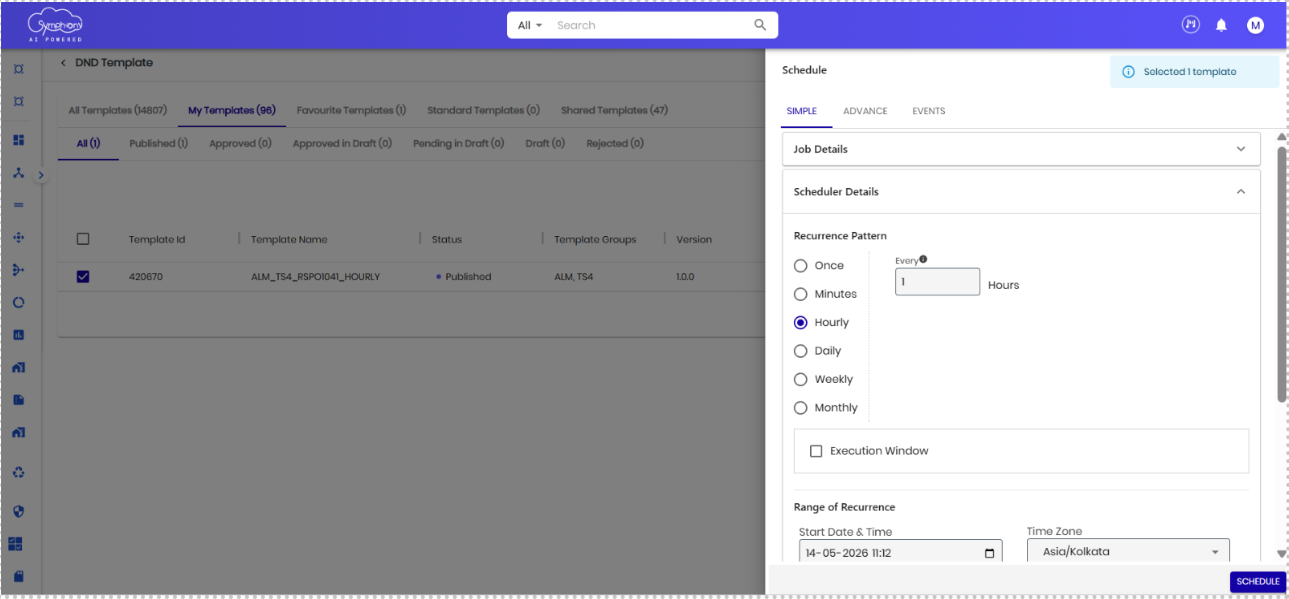
After configuring the Schedule Job node with all mandatory ALM Service inputs, users can schedule the template directly from Symphony. The scheduling configuration allows users to define recurrence patterns, execution frequency, start time, and other scheduling parameters for automated job execution.
Follow the steps to schedule templates configured with the Schedule Job node:
- Navigate to the Templates section in Symphony.
- Select the required template that contains the configured Schedule Job node.
- Click the Schedule option to open the scheduling configuration panel.
- Choose the required Recurrence Pattern such as Once, Hourly, Daily, Weekly, or Monthly.
- Maintain the scheduling details, including execution frequency, start date, time, and time zone.
- Review the scheduling configuration and click Schedule to activate the template execution.